Email is one of the most common things people ask AI assistants to help with, and one of the easiest places to get it wrong. A chatbot can turn three rough bullet points into a clear, polite message in seconds. It can also produce the kind of stiff, over-friendly email that makes the reader wonder whether a person wrote it at all.
Key takeaways
- Before asking AI for a draft, decide the outcome you want, your relationship with the reader and the key facts, since missing details may be invented.
- Give the AI your own voice by pasting a few emails you wrote, describing your style or banning the stock phrases you never use.
- Treat every AI draft as a first draft by checking facts, removing filler, confirming commitments and reading it out loud before you send it.
- Remove names, account numbers and confidential details before pasting emails into a chatbot, and check your workplace AI policy and the data settings of the tool.
This guide covers how to get the useful part without the robotic part: what to tell the AI, how to edit what it gives you, and which emails you should still write yourself.
Start with what you want to happen
Most weak AI emails come from weak instructions. “Write an email to my landlord about the heating” gives the model almost nothing to work with, so it fills the gaps with generic phrases. Before you ask, decide what the reader should do once they’ve read it. Reply with a date? Approve a budget? Fix the heating by Friday?
Think about who they are to you, too. Your manager, a client you’ve worked with for years, a stranger and a supplier who’s late for the third time all need different emails. Then gather the facts: dates, amounts, order numbers and what’s already been said. AI can’t know these, and if you leave them out it may invent plausible-sounding placeholders.
A better request looks like this:
Here’s what that looks like in practice: “Write a short email to my landlord, Sam. The heating in my flat has not worked since Monday 3 November. I reported it by phone on Tuesday and was told someone would come Wednesday, but nobody did. I want a repair visit booked before Friday. Tone: polite but firm. Under 120 words. No subject line clichés.”
Give it your voice, not a generic one
AI models default to a neutral, slightly formal register with a lot of hedging: “I hope this email finds you well,” “Please don’t hesitate to reach out.” If that isn’t how you write, tell it. The quickest way is to paste two or three emails you’ve written and ask it to match their length, greeting style and tone. You can also describe your style in plain words, something like “I write short emails, first names, no exclamation marks, and I get to the point in the first sentence.”
Banning phrases helps too. List five or six stock phrases you never use, and most of the robotic feel goes away.
If you use AI for email often, save these instructions in a custom assistant or a reusable note so you do not have to repeat them. Our guide to setting up a custom AI assistant explains how.
Use AI for the jobs it does best
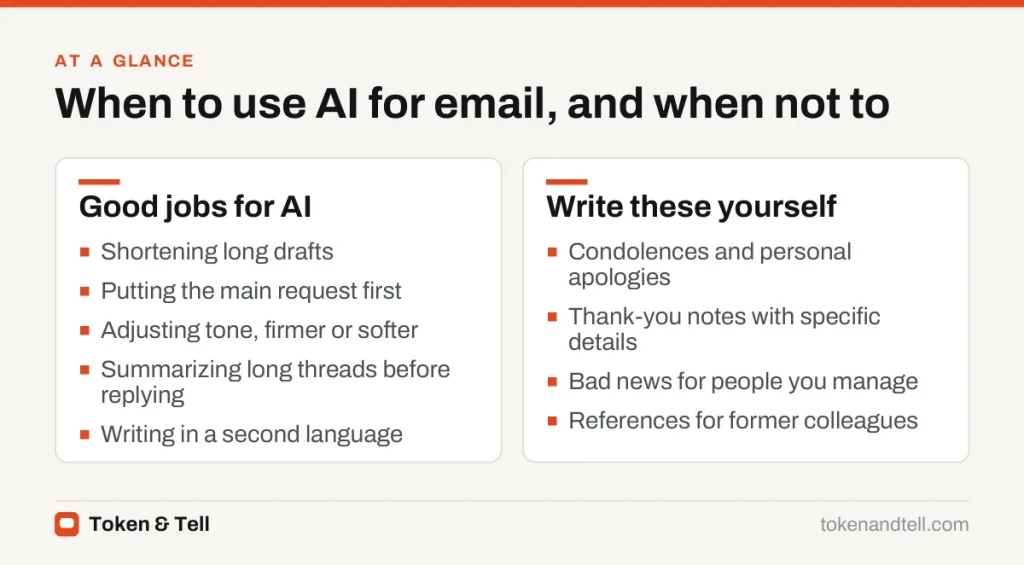
AI is most helpful for the tedious parts of email rather than the personal ones. Paste in a long draft and ask for a version half the length that keeps every request and date. Ask it to move the main request into the first two sentences and push background further down. Tone changes like “make this less defensive” or “make this firmer without being rude” are things models handle well.
For long threads, ask for a summary of what each person wants, then a draft reply that answers each point. AI can also help you write clearly in a language you know less well, but get a fluent colleague to check anything important.
Edit before you send
Treat the AI draft as a first draft. A quick review catches the problems that make readers suspicious or cause real mistakes:
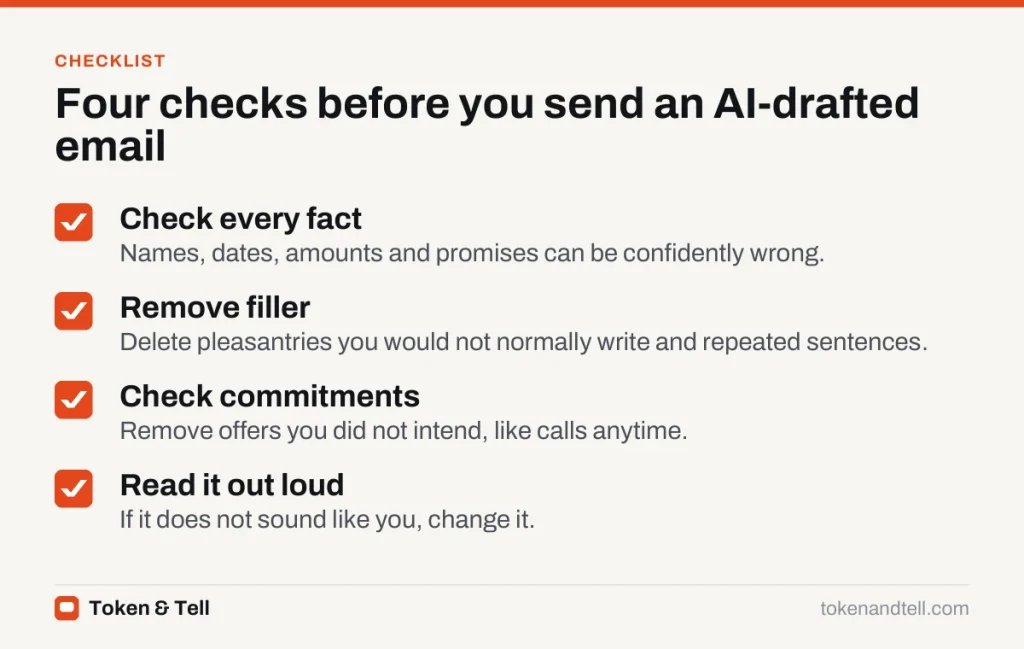

Check every name, date, amount and promise. AI models can state wrong details with complete confidence, as we explain in our guide to spotting AI hallucinations. Delete opening pleasantries you wouldn’t normally write, and any sentence that repeats the one before it.
Watch for commitments you didn’t intend. AI sometimes adds offers like “I’m happy to jump on a call anytime,” so make sure you mean everything the email promises. Then read it out loud. If it doesn’t sound like something you’d say, change it.
Watch what you paste into the chatbot
Emails often contain other people’s personal information, confidential business details or both. Before pasting a thread into an AI tool:
- Check your workplace AI policy. Many organizations only allow approved tools for work data.
- Remove or replace names, addresses, account numbers and anything covered by a confidentiality agreement.
- Review the data settings of the tool you use, including whether your conversations may be used to train future models. Our AI chatbot privacy guide walks through the main settings.
AI features built into email apps, such as the writing assistants in Gmail and Outlook, work on messages already stored with that provider, but they are still covered by your organization’s rules and the provider’s terms.
Emails you should still write yourself
Some messages lose their value if the reader suspects a machine wrote them. Consider writing these without AI, or using it only to check spelling:
- Condolences and personal apologies
- Thank-you notes where specific details matter
- Messages delivering bad news to people you manage
- Anything where your judgment is the point, such as a reference for a former colleague
There is no rule against using AI for these, but people tend to notice generic sympathy. A shorter message in your own words usually lands better than a polished one that could have been sent to anyone.
A simple workflow
- Write the facts and your goal as rough notes.
- Ask the AI for a draft, including your tone and length.
- Ask for one specific improvement, such as “shorter” or “clearer request.”
- Edit the result yourself: facts, filler, promises, voice.
- Send only when you would be comfortable if the reader asked, “Did you write this?”
Frequently asked questions
Can people tell if an email was written by AI?
Often, when it relies on stock phrases and generic warmth. Giving the AI a few emails you wrote and banning phrases you never use removes most of the robotic feel.
Is it safe to paste work emails into an AI chatbot?
Check your workplace AI policy first, remove names, addresses, account numbers and confidential details, and review whether the tool may use your conversations to train future models.
What should I include when asking AI to write an email?
State the outcome you want, your relationship with the reader, the key facts such as dates and amounts, and the tone and length. Facts you leave out may be filled with invented placeholders.
Which emails should I not write with AI?
Condolences, personal apologies, detailed thank-you notes, bad news for people you manage and references, where generic wording undermines the message.
Sources
- Prompt engineering overview, Anthropic documentation
- Prompt engineering guide, OpenAI documentation
- Write with Gemini in Gmail, Google Help