Large companies write AI strategies with steering committees and multi-year roadmaps. A team of five, fifteen or fifty people does not need that, but it does need more than “everyone use ChatGPT and see what happens.” Without a few shared decisions, you end up with sensitive data in personal accounts, duplicated subscriptions and no idea whether any of it is paying off.
Key takeaways
- A good small-team AI strategy fits on one page and answers five questions about problems, tools, data rules, learning and measurement.
- Start from work, not tools, and pick two or three frequent tasks where mistakes are easy to catch and the data is not highly sensitive.
- Write plain-language data rules covering what can go into approved tools, what must never go in and who to ask when unsure.
- Measure each task before rollout, measure again after six to eight weeks, and include the time spent checking and fixing AI output.
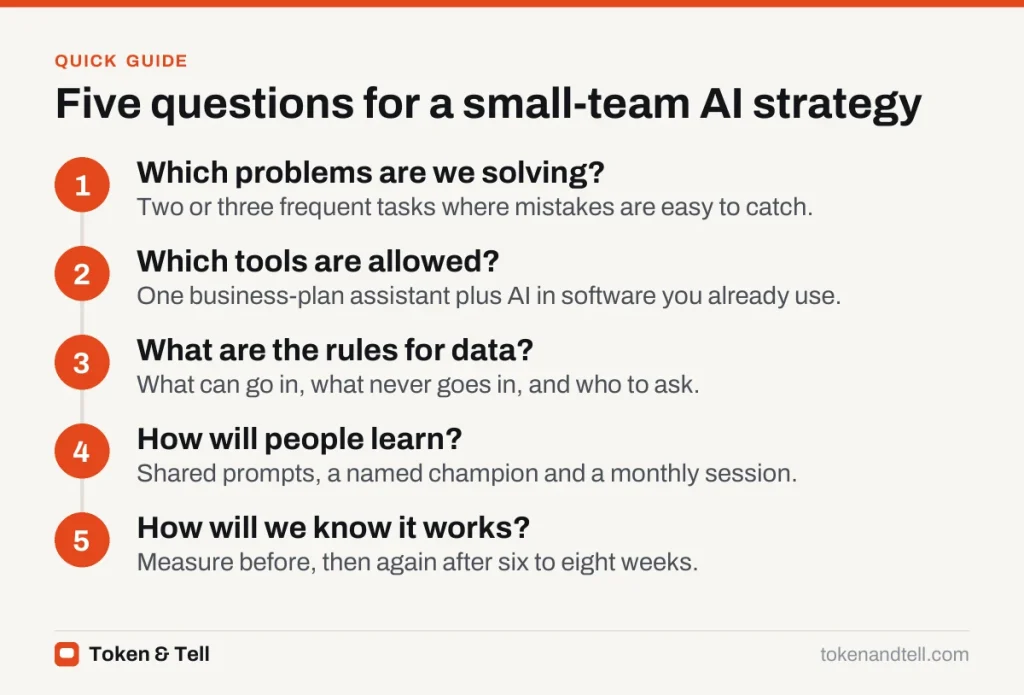
A good small-team AI strategy fits on one page and answers five questions.
1. Which problems are we trying to solve?
Start from work, not tools. List the tasks that take the most time, cause the most frustration, or create a bottleneck. Then ask which of them involve reading, writing, summarizing, sorting or answering routine questions, because those are where today’s AI tools are strongest.
Good first candidates happen often, weekly or daily, so small time savings add up. Mistakes in them are easy to catch, because a person reviews the output before it matters. And the data isn’t highly sensitive, or you have a tool approved for that data.
Examples include drafting first versions of proposals, summarizing customer calls, answering internal “where is the policy on…” questions, cleaning up spreadsheets, and turning meeting notes into action lists. Our guide to how small businesses can start using AI has more examples by function.
Pick two or three problems to start with. A short list you actually work through beats a long list nobody owns.
2. Which tools are allowed?
Decide on a small set of approved tools and why. For most small teams this means:
- One general AI assistant on a business or team plan, where the provider commits not to train on your data and gives you admin controls.
- AI features in software you already pay for, such as your email, office suite, CRM or help desk, turned on deliberately rather than by default.
- A process for trying new tools, so people can suggest them without quietly signing up with work data.
Business plans cost more than free accounts, but they usually include the data protections, shared workspaces and admin settings you need. Consolidating on one assistant also makes training and sharing good prompts much easier.
3. What are the rules for data?
This is the part most teams skip and later regret. Write down, in plain language:
- What can go into approved AI tools (for example, internal documents and anonymized customer questions)
- What must never go in (for example, passwords, payment details, health information, anything under a confidentiality agreement)
- Who to ask when unsure
These rules can live in a short AI acceptable use policy. Keep it to one page so people actually read it.
One rule prevents most problems: a person is responsible for anything AI produces before it reaches a customer, a colleague or the public. AI drafts, and people decide.
4. How will people learn to use it?
Buying licenses doesn’t create skill. Teams that get value from AI usually keep a shared document of prompts and workflows that worked, organized by task. They name a champion, one person who doesn’t need to be technical, to try things first and help others. And they make time, often an hour a month, for the team to show each other what’s working and what isn’t.
Be clear that AI is there to take on tedious work, not to judge people by how much they use it. Anxiety about job security makes people hide what they are doing, which makes it harder to spread good practice and catch problems.
5. How will we know if it is working?
Before rolling out a tool for a task, write down how you measure that task today: time per week, turnaround time, error rate, customer satisfaction. After six to eight weeks, measure again. Include the time spent checking and fixing AI output, which is easy to forget.
If a use case is not saving time or improving quality, stop it and try another. Our guide to measuring the ROI of AI covers the numbers in more detail.
A one-page template
| Section | What to write |
|---|---|
| Goals | Two or three problems we are solving, with how we measure them today |
| Approved tools | Names, plans, who administers them |
| Data rules | Allowed, never allowed, who to ask |
| Review | Who checks AI output before it goes out, by type of work |
| Learning | Champion, shared prompt library, monthly session |
| Review date | When we revisit this page (every quarter is sensible) |
Common mistakes
The most common mistake is starting with the most ambitious project. Automating customer-facing decisions first puts your reputation at risk while you’re still learning. Another is letting tools multiply; five overlapping AI subscriptions cost money and scatter your data.
Don’t ignore the quiet adopters, either. Some of your team are probably already using AI, possibly on personal accounts, so ask them what works and bring it into the open. Finally, revisit the plan. AI tools change quickly, and a quarterly review keeps the page accurate.
For a more formal approach to managing AI risk, the US National Institute of Standards and Technology publishes a free AI Risk Management Framework. It is written for organizations of any size and is a useful checklist once your use of AI grows.
Frequently asked questions
Does a small business need an AI strategy?
It does not need a long document, but a few shared decisions prevent sensitive data in personal accounts, duplicated subscriptions and no way of telling whether AI is paying off. One page is enough.
Which AI tool should a small team use?
Most small teams do well with one general assistant on a business or team plan that does not train on your data and has admin controls, plus AI features in software they already pay for.
What data should never go into AI tools?
Passwords, payment details, health information and anything under a confidentiality agreement should stay out. Write down what is allowed and who to ask when unsure.
How do you know if AI is saving time?
Measure the task before rollout, such as time per week or error rate, then measure again after six to eight weeks, including the time spent checking and fixing AI output.
Sources
- AI Risk Management Framework, National Institute of Standards and Technology
- The state of AI, McKinsey & Company
- Guidance on AI and data protection, UK Information Commissioner’s Office